SQL Subqueries
What are Subqueries?
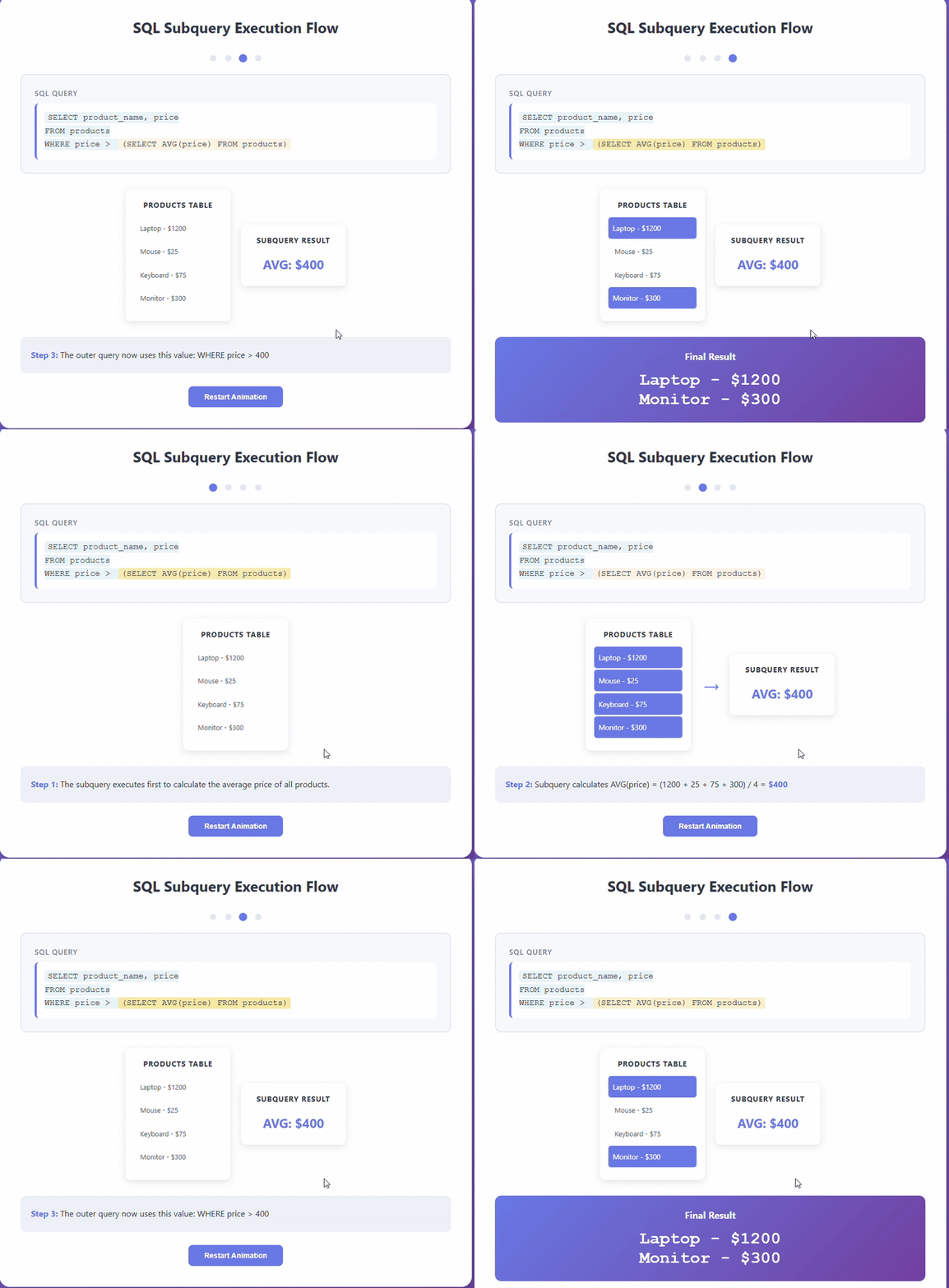
SQL Subqueries (also called nested queries or inner queries) are queries placed inside another query. Think of them as a question within a question - you ask one thing first, then use that answer to get your final result.
Key Characteristics of Subqueries:
-
Nested Structure: A query inside another query, wrapped in parentheses.
-
Execution Order: Inner query runs first, then outer query uses its results.
-
Versatile Placement: Can appear in SELECT, FROM, WHERE, or HAVING clauses.
-
Return Types: Can return a single value, a row, a column, or a full table.
When to Use Subqueries:
- Complex Filtering: Find customers who spent more than the average order value
- Step-by-Step Logic: Break down complicated queries into manageable pieces
- Dynamic Comparisons: Compare rows against calculated values
- Data Validation: Check if records exist in other tables
- Aggregated Filtering: Filter based on grouped calculations
Real-World Example: You want to find all employees earning more than their department's average salary. Instead of calculating each department's average separately, you nest a query that figures out the average, then compare against it.
Basic Subquery Syntax
-- Subquery in WHERE clause (most common)
SELECT column1, column2
FROM table1
WHERE column1 = (SELECT column FROM table2 WHERE condition);
| Component | Purpose | Example |
|---|---|---|
| Outer Query | Main query that uses subquery results | SELECT name FROM employees |
| Inner Query | Nested query that executes first | (SELECT AVG(salary) FROM employees) |
| Parentheses | Required to wrap subqueries | WHERE salary > (subquery) |
| Comparison | How outer query uses subquery result | =, >, <, IN, EXISTS |
Subquery Placement Options
-- In WHERE clause
SELECT * FROM products
WHERE price > (SELECT AVG(price) FROM products);
-- In SELECT clause (scalar subquery)
SELECT
    name,
    salary,
    (SELECT AVG(salary) FROM employees) AS avg_salary
FROM employees;
-- In FROM clause (derived table)
SELECT dept, avg_sal
FROM (
    SELECT department AS dept, AVG(salary) AS avg_sal
    FROM employees
    GROUP BY department
) AS dept_averages;
-- In HAVING clause
SELECT department, AVG(salary)
FROM employees
GROUP BY department
HAVING AVG(salary) > (SELECT AVG(salary) FROM employees);
Types of Subqueries
- Scalar Subquery
- Column Subquery
- Row Subquery
- Table Subquery
- Correlated Subquery
-- Returns a single value
-- Find products more expensive than average
SELECT
    product_name,
    price,
    (SELECT AVG(price) FROM products) AS avg_price,
    price - (SELECT AVG(price) FROM products) AS price_difference
FROM products
WHERE price > (SELECT AVG(price) FROM products)
ORDER BY price DESC;

-- Scalar subquery must return exactly one value
-- Returns a single column (multiple rows)
-- Find customers who placed orders in 2024
SELECT
    customer_id,
    customer_name,
    email
FROM customers
WHERE customer_id IN (
    SELECT DISTINCT customer_id
    FROM orders
    WHERE YEAR(order_date) = 2024
)
ORDER BY customer_name;

-- Use IN, ANY, or ALL with column subqueries
-- Returns a single row (multiple columns)
-- Find employee with exact match of max salary and earliest hire date
SELECT
    employee_id,
    employee_name,
    salary,
    hire_date,
    department
FROM employees
WHERE (salary, hire_date) = (
    SELECT MAX(salary), MIN(hire_date)
    FROM employees
);

-- Compares multiple columns at once
-- Returns a full table (multiple rows and columns)
-- Calculate revenue by customer segment
SELECT
    segment,
    total_customers,
    total_revenue,
    ROUND(total_revenue / total_customers, 2) AS avg_revenue_per_customer
FROM (
    SELECT
        CASE
            WHEN total_spent > 5000 THEN 'VIP'
            WHEN total_spent > 1000 THEN 'Regular'
            ELSE 'Occasional'
        END AS segment,
        COUNT(*) AS total_customers,
        SUM(total_spent) AS total_revenue
    FROM (
        SELECT
            customer_id,
            SUM(total_amount) AS total_spent
        FROM orders
        GROUP BY customer_id
    ) customer_totals
    GROUP BY segment
) segment_stats
ORDER BY total_revenue DESC;

-- Nested subqueries working together
-- References outer query (runs for each row)
-- Find employees earning more than their department average
SELECT
    e1.employee_name,
    e1.department,
    e1.salary,
    (
        SELECT AVG(e2.salary)
        FROM employees e2
        WHERE e2.department = e1.department
    ) AS dept_avg_salary,
    e1.salary - (
        SELECT AVG(e2.salary)
        FROM employees e2
        WHERE e2.department = e1.department
    ) AS difference
FROM employees e1
WHERE e1.salary > (
    SELECT AVG(e2.salary)
    FROM employees e2
    WHERE e2.department = e1.department
)
ORDER BY e1.department, e1.salary DESC;

-- Inner query references outer query's current row
Practical Examples
- Above Average Analysis
- Top Performers
- Customer Segmentation
- EXISTS Example
- ANY/ALL Operators
- Sample Output
-- Find products selling above their category average
SELECT
    p.product_id,
    p.product_name,
    p.category,
    p.price,
    (
        SELECT AVG(price)
        FROM products p2
        WHERE p2.category = p.category
    ) AS category_avg,
    ROUND(
        (p.price - (
            SELECT AVG(price)
            FROM products p2
            WHERE p2.category = p.category
        )) / (
            SELECT AVG(price)
            FROM products p2
            WHERE p2.category = p.category
        ) * 100,
        2
    ) AS percent_above_avg
FROM products p
WHERE p.price > (
    SELECT AVG(price)
    FROM products p2
    WHERE p2.category = p.category
)
ORDER BY p.category, percent_above_avg DESC;
-- Find top 3 products in each category by sales
SELECT
    category,
    product_name,
    total_sales,
    sales_rank
FROM (
    SELECT
        p.category,
        p.product_name,
        SUM(oi.quantity * oi.unit_price) AS total_sales,
        (
            SELECT COUNT(*) + 1
            FROM order_items oi2
            JOIN products p2 ON oi2.product_id = p2.product_id
            WHERE p2.category = p.category
            GROUP BY oi2.product_id
            HAVING SUM(oi2.quantity * oi2.unit_price) >
                   SUM(oi.quantity * oi.unit_price)
        ) AS sales_rank
    FROM order_items oi
    JOIN products p ON oi.product_id = p.product_id
    GROUP BY p.product_id, p.category, p.product_name
) ranked_products
WHERE sales_rank <= 3
ORDER BY category, sales_rank;
-- Segment customers based on spending compared to overall average
SELECT
    c.customer_id,
    c.customer_name,
    c.email,
    COALESCE(customer_stats.total_orders, 0) AS total_orders,
    COALESCE(customer_stats.total_spent, 0) AS total_spent,
    (SELECT AVG(total_amount) FROM orders) AS overall_avg_order,
    CASE
        WHEN customer_stats.total_spent > (
            SELECT AVG(total_spent)
            FROM (
                SELECT customer_id, SUM(total_amount) AS total_spent
                FROM orders
                GROUP BY customer_id
            ) AS all_customers
        ) * 2 THEN 'Premium'
        WHEN customer_stats.total_spent > (
            SELECT AVG(total_spent)
            FROM (
                SELECT customer_id, SUM(total_amount) AS total_spent
                FROM orders
                GROUP BY customer_id
            ) AS all_customers
        ) THEN 'Regular'
        ELSE 'Basic'
    END AS customer_tier
FROM customers c
LEFT JOIN (
    SELECT
        customer_id,
        COUNT(*) AS total_orders,
        SUM(total_amount) AS total_spent
    FROM orders
    GROUP BY customer_id
) customer_stats ON c.customer_id = customer_stats.customer_id
ORDER BY total_spent DESC;
-- Find customers who have never placed an order
SELECT
    c.customer_id,
    c.customer_name,
    c.email,
    c.registration_date,
    DATEDIFF(CURRENT_DATE, c.registration_date) AS days_since_registration
FROM customers c
WHERE NOT EXISTS (
    SELECT 1
    FROM orders o
    WHERE o.customer_id = c.customer_id
)
AND c.registration_date < DATE_SUB(CURRENT_DATE, INTERVAL 30 DAY)
ORDER BY c.registration_date;

-- EXISTS is efficient - stops checking once it finds a match
-- Find products more expensive than ANY product in Electronics
SELECT product_name, price, category
FROM products
WHERE price > ANY (
    SELECT price
    FROM products
    WHERE category = 'Electronics'
)
AND category != 'Electronics';

-- Find products more expensive than ALL products in Electronics
SELECT product_name, price, category
FROM products
WHERE price > ALL (
    SELECT price
    FROM products
    WHERE category = 'Electronics'
)
ORDER BY price DESC;

-- ANY means "at least one", ALL means "every single one"
-- Sample result for above-average products:

product_id | product_name    | category    | price   | category_avg | percent_above_avg
-----------|-----------------|-------------|---------|--------------|------------------
15         | Laptop Pro      | Electronics | 1299.99 | 756.45       | 71.85
23         | Gaming Monitor  | Electronics | 899.99  | 756.45       | 18.98
42         | Premium Mouse   | Electronics | 149.99  | 756.45       | -80.17
8          | Office Desk     | Furniture   | 449.99  | 312.50       | 44.00

-- Shows products priced above their category's average
-- Includes the average and percentage difference
Subqueries vs JOINs
When to Choose What:
Use Subqueries When:
- Logic is clearer with step-by-step thinking
- You need aggregated values for comparison
- Checking for existence/non-existence (EXISTS/NOT EXISTS)
- One-time calculations that don't need repeated access
- Building derived tables for complex analysis
Use JOINs When:
- Combining columns from multiple tables
- Need better performance with large datasets
- Retrieving data from multiple tables simultaneously
- Working with well-indexed foreign keys
Example Comparison:
-- Using Subquery
SELECT customer_name
FROM customers
WHERE customer_id IN (
    SELECT customer_id
    FROM orders
    WHERE order_date >= '2024-01-01'
);

-- Using JOIN (often faster)
SELECT DISTINCT c.customer_name
FROM customers c
INNER JOIN orders o ON c.customer_id = o.customer_id
WHERE o.order_date >= '2024-01-01';
Common Subquery Patterns
Useful Patterns You'll Use Often:
-
Find Records NOT IN Another Table:
SELECT product_nameFROM productsWHERE product_id NOT IN (SELECT DISTINCT product_idFROM order_items);-- Finds products never ordered -
Compare Against Aggregates:
SELECT employee_name, salaryFROM employeesWHERE salary > (SELECT AVG(salary) FROM employees);-- Above-average salaries -
Ranked Results:
SELECT *FROM productsWHERE price = (SELECT MAX(price) FROM products);-- Most expensive product -
Conditional Aggregation:
SELECTcategory,COUNT(*) as product_countFROM productsGROUP BY categoryHAVING COUNT(*) > (SELECT AVG(cat_count)FROM (SELECT COUNT(*) as cat_countFROM productsGROUP BY category) AS category_counts);-- Categories with above-average product counts
Common Mistakes to Avoid
Watch Out For These:
-
Forgetting Parentheses: Subqueries must be wrapped
-- WrongWHERE customer_id IN SELECT customer_id FROM orders;-- CorrectWHERE customer_id IN (SELECT customer_id FROM orders); -
Multiple Values When Expecting One:
-- Will error if subquery returns multiple rowsWHERE price = (SELECT price FROM products);-- Use IN for multiple valuesWHERE price IN (SELECT price FROM products WHERE category = 'Electronics'); -
NULL Handling with NOT IN:
-- NOT IN can behave unexpectedly with NULLs-- Use NOT EXISTS insteadWHERE NOT EXISTS (SELECT 1 FROM orders WHERE customer_id = customers.id); -
Performance Blindness:
-- Don't nest too deep - hard to read and slow-- Keep it to 2-3 levels maximum
Best Practices
- Keep It Simple: If it's hard to understand, consider breaking it down
- Name Derived Tables: Always alias subqueries in FROM clause
- Comment Complex Logic: Future you will thank present you
- Test Step by Step: Run inner queries separately first
- Consider Alternatives: Sometimes a
JOINorCTEis clearer - Use Appropriate Operators: EXISTS for existence, IN for lists, = for single values
Conclusion
Subqueries are your tool for asking layered questions - calculate something first, then use that answer to get what you really want. They make complex logic readable by breaking problems into steps. Start with simple subqueries in WHERE clauses, then gradually work up to more complex patterns.
Remember : if your subquery gets too complicated, there's probably a simpler way to write it. Keep it clear, keep it tested, and your queries will be both powerful and maintainable.