
Hey automation enthusiasts! 🤖
I still remember the moment when I first connected OpenAI's GPT to a Google Sheets workflow in N8N. What started as a simple data processing task suddenly became an intelligent system that could analyze customer feedback, categorize it by sentiment, and automatically generate personalized responses. It was like watching automation evolve from basic "if-this-then-that" logic to something that could actually think.
Today, I want to take you through the fascinating world of N8N AI workflows - how they work, why they're game-changing, and how you can build your own intelligent automation systems that would have seemed like magic just a few years ago.
What is N8N AI Automation?
N8N (pronounced "n-eight-n") is a powerful workflow automation tool that's taken the integration world by storm. But when you add AI capabilities into the mix, something beautiful happens - your workflows stop being simple data pipelines and start becoming intelligent decision-making systems.
Think of traditional automation as a skilled assembly line worker: fast, reliable, but limited to predefined tasks. N8N AI workflows are more like having a smart assistant who can read, understand, analyze, and make contextual decisions while still maintaining the speed and reliability of automation.
The magic lies in combining N8N's visual workflow builder with AI services like OpenAI, Google's AI Platform, or even custom machine learning models to create workflows that can:
- Understand natural language
- Make complex decisions based on context
- Generate human-like responses
- Analyze patterns in data
- Adapt to new situations
The Architecture: Visual Workflows Meet AI Intelligence
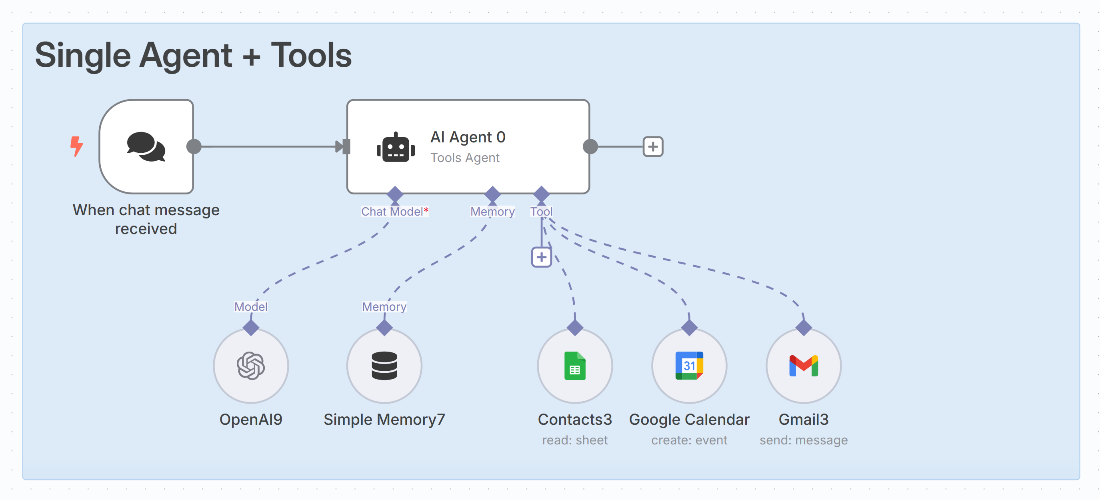
When you look at an N8N AI workflow, you're seeing a visual representation of an intelligent automation pipeline. Let's break down the key components:
1. Trigger Nodes: The Starting Point
Every N8N workflow begins with a trigger - the event that sets everything in motion:
Webhook Triggers:
- HTTP requests from external applications
- Perfect for real-time integrations
- Can receive data from forms, apps, or other systems
Schedule Triggers:
- Time-based automation (cron jobs made visual)
- Great for periodic data processing
- Can run daily reports, weekly summaries, etc.
App Triggers:
- Direct integration with services (Gmail, Slack, Salesforce)
- Event-driven automation (new email, message, record created)
- Real-time responsiveness to external changes
Manual Triggers:
- On-demand execution
- Perfect for testing and ad-hoc processing
2. Data Processing Nodes: The Workhorses
These nodes handle the heavy lifting of data transformation and routing:
HTTP Request Nodes:
- Connect to any REST API
- Fetch data from external services
- Send processed results to other systems
Function Nodes:
- Custom JavaScript execution
- Complex data manipulation
- Custom business logic implementation
Conditional Logic Nodes:
- IF/THEN/ELSE branching
- Route data based on conditions
- Create intelligent decision trees
Data Transformation Nodes:
- Filter, sort, and reshape data
- Extract specific fields
- Combine data from multiple sources
3. AI Integration Nodes: The Intelligence Layer
This is where the magic happens - nodes that bring artificial intelligence into your workflows:
OpenAI Nodes:
- GPT for text generation and analysis
- DALL-E for image generation
- Embeddings for semantic search
- Fine-tuned models for specific tasks
Google AI Nodes:
- Natural Language Processing
- Translation services
- Vision AI for image analysis
- AutoML integration
Anthropic Claude Nodes:
- Advanced reasoning and analysis
- Long-form content generation
- Code assistance and review
Custom AI Model Nodes:
- Integration with your own ML models
- TensorFlow and PyTorch model serving
- Edge AI deployment
4. Output Nodes: The Final Destination
Where your processed, AI-enhanced data ends up:
Database Nodes:
- Store results in PostgreSQL, MySQL, MongoDB
- Build intelligent data lakes
- Create audit trails
Notification Nodes:
- Send Slack messages, emails, SMS
- Create intelligent alerting systems
- Deliver personalized communications
File System Nodes:
- Generate reports, documents, images
- Store processed data files
- Create automated deliverables
How AI Transforms Traditional Workflows
Let me show you the difference between traditional automation and AI-powered workflows with a real example:
Traditional Workflow: Simple Customer Support Ticket Routing
New Email → Extract Sender → Check Department → Forward to Team → Done
This works, but it's rigid. What if the email is about multiple departments? What if the subject line is unclear?
AI-Enhanced Workflow: Intelligent Customer Support
New Email → AI Analysis (Extract Intent, Sentiment, Urgency) →
Smart Routing (Consider Context, History, Workload) →
Generate Response Draft → Human Review → Send Personalized Response
The AI version can:
- Understand the actual meaning behind customer messages
- Consider emotional context (frustrated vs. curious customers)
- Route based on content, not just keywords
- Generate contextual response drafts
- Learn from previous interactions
Core AI Workflow Patterns
After building dozens of AI workflows, I've identified several powerful patterns that you can adapt for almost any use case:
1. The Content Intelligence Pipeline
Use Case: Automatically process and categorize incoming content
Flow Structure:
Content Trigger → AI Content Analysis → Categorization →
Sentiment Analysis → Keyword Extraction → Storage + Routing
Real-World Applications:
- Social media monitoring and response
- Customer feedback processing
- Content moderation and filtering
- News article categorization
2. The Decision Intelligence Framework
Use Case: Make complex decisions based on multiple data sources
Flow Structure:
Data Collection → AI Analysis → Risk Assessment →
Decision Matrix → Automated Action + Human Notification
Real-World Applications:
- Loan approval workflows
- Inventory restocking decisions
- Quality control assessment
- Investment recommendations
3. The Communication Intelligence System
Use Case: Generate and personalize communications at scale
Flow Structure:
Trigger Event → Context Gathering → AI Content Generation →
Personalization → Multi-Channel Delivery → Response Tracking
Real-World Applications:
- Personalized marketing campaigns
- Customer onboarding sequences
- Support ticket responses
- Sales follow-up automation
4. The Data Intelligence Engine
Use Case: Extract insights and patterns from large datasets
Flow Structure:
Data Ingestion → AI Analysis → Pattern Recognition →
Insight Generation → Visualization → Action Recommendations
Real-World Applications:
- Sales trend analysis
- Customer behavior prediction
- Operational efficiency optimization
- Risk pattern detection
Real-World Use Cases and Success Stories
Here are some powerful AI workflows I've seen in production:
1. E-commerce Intelligence Platform
Challenge: Online store receiving thousands of product reviews daily Solution: AI workflow that analyzes reviews, extracts insights, and automatically updates product descriptions
Results:
- 95% reduction in manual review processing time
- 40% improvement in product page conversion rates
- Automatic identification of product issues before they become major problems
2. HR Recruitment Automation
Challenge: Screening hundreds of resumes for multiple positions Solution: AI workflow that analyzes resumes, matches them to job requirements, and generates personalized outreach
Results:
- 80% reduction in initial screening time
- 60% improvement in candidate-job fit quality
- Personalized communication that increased response rates by 45%
3. Financial Risk Assessment
Challenge: Manually reviewing loan applications across multiple criteria Solution: AI workflow that combines financial data analysis with behavioral pattern recognition
Results:
- 70% faster decision-making process
- 25% improvement in risk prediction accuracy
- Consistent evaluation criteria across all applications
4. Content Marketing Automation
Challenge: Creating personalized content for different audience segments Solution: AI workflow that analyzes audience data and generates tailored content automatically
Results:
- 10x increase in content production capacity
- 35% improvement in engagement rates
- Consistent brand voice across all generated content
The Integration Ecosystem: N8N's Superpower
What makes N8N AI workflows truly powerful is the vast ecosystem of integrations available:
Popular Service Integrations:
Communication Platforms:
- Slack, Discord, Microsoft Teams
- Email (Gmail, Outlook, SendGrid)
- SMS (Twilio, Amazon SNS)
Data Stores:
- Google Sheets, Airtable
- Databases (PostgreSQL, MySQL, MongoDB)
- Cloud Storage (Google Drive, Dropbox, AWS S3)
Business Applications:
- CRM (Salesforce, HubSpot, Pipedrive)
- Project Management (Notion, Asana, Jira)
- E-commerce (Shopify, WooCommerce)
AI and ML Services:
- OpenAI (GPT, DALL-E, Whisper)
- Google AI (Vision, Language, Translation)
- AWS AI (Comprehend, Rekognition, Textract)
- Custom ML models via API
Creating Intelligent Integration Chains:
Salesforce Lead → AI Qualification → Google Sheets Update →
Slack Notification → Email Sequence → Calendar Booking →
Follow-up Automation
Each step can be enhanced with AI intelligence, creating a seamless experience that feels magical to end users.
Future Trends: Where AI Workflows Are Heading
The world of AI automation is evolving rapidly. Here are the trends I'm watching:
1. Multi-Modal AI Integration
Workflows that can process text, images, audio, and video in the same pipeline:
Voice Input → Speech-to-Text → Intent Analysis →
Image Processing → Decision Making → Multi-Format Response
2. Autonomous Workflow Optimization
AI systems that can optimize their own workflows:
- Automatically adjust parameters based on performance
- Suggest new integration opportunities
- Identify bottlenecks and propose solutions
3. Collaborative AI Workflows
Multiple AI agents working together within a single workflow:
- Specialist AIs for different domains
- Consensus-building among AI models
- Dynamic role assignment based on task requirements
4. Edge AI Integration
Running AI models directly within N8N workflows:
- Reduced latency and costs
- Enhanced privacy and data security
- Offline operation capabilities
Getting Started: Your AI Workflow Journey
Ready to build your first AI workflow? Here's your roadmap:
Phase 1: Foundation Building (Week 1-2)
- Set up N8N (self-hosted or cloud)
- Create your first simple workflow without AI
- Learn the basic nodes and flow patterns
- Connect to your most-used services
Phase 2: AI Integration (Week 3-4)
- Add your first AI node (start with OpenAI)
- Build a simple text analysis workflow
- Experiment with different prompts and parameters
- Learn prompt engineering basics
Phase 3: Advanced Patterns (Month 2)
- Implement conditional logic based on AI results
- Create multi-step AI processing workflows
- Add error handling and fallback logic
- Optimize for performance and cost
Phase 4: Production Deployment (Month 3)
- Monitor and log workflow performance
- Implement proper security measures
- Create comprehensive documentation
- Train your team on workflow management
Resources to Accelerate Your Learning:
Documentation and Tutorials:
- N8N official documentation and community forum
- AI service provider documentation (OpenAI, Google AI, etc.)
- Workflow template galleries and examples
Community and Support:
- N8N Discord community
- GitHub repositories with example workflows
- YouTube tutorials and case studies
Best Practice Guides:
- Security considerations for API keys and sensitive data
- Performance optimization techniques
- Cost management strategies
Conclusion: The Future is Intelligent Automation
AI workflows in N8N represent a fundamental shift in how we think about automation. We're moving from rigid, rule-based systems to intelligent, adaptive processes that can understand context, make decisions, and learn from experience.
The beauty of this technology lies not just in its technical capabilities, but in how it democratizes artificial intelligence. You don't need to be a data scientist or machine learning engineer to build sophisticated AI systems. With N8N's visual interface and the growing ecosystem of AI services, anyone can create intelligent automation that would have required a team of specialists just a few years ago.
Whether you're automating customer service, processing business data, generating content, or solving domain-specific challenges, AI workflows give you the power to build systems that are not just fast and reliable, but genuinely intelligent.
The future belongs to organizations that can seamlessly blend human creativity with artificial intelligence, and N8N AI workflows are the bridge that makes this possible. So start small, experiment freely, and prepare to be amazed by what you can build when you combine the power of automation with the intelligence of AI.
The next time someone asks you about the future of automation, show them an N8N AI workflow in action. Watch their expression change from skepticism to wonder as they realize we're not just talking about the future anymore - we're living in it. Happy automating!
Comments
Powered by GitHub Discussions