SQL Primary and Foreign Keys
📙 Welcome to SQL Keys!
Hi, new SQL adventurer! Keys are like superpowers for your database—they help you identify and connect data easily. A primary key is like a unique badge for each row, while a foreign key is like a bridge linking tables together. We’ll use a Student Details table and a Student Marks table to explore these with fun examples.
📘 What Are Keys?
Keys are special columns that make your database work smoothly:
- Primary Key (PK): A unique ID for every row in a table (e.g., a student’s roll number).
- Foreign Key (FK): A column that links to a primary key in another table (e.g., connecting a student to their marks).
Together, they help you find data fast and keep everything connected!
Pro Tip: Always use keys to give your tables structure — think of them as the backbone of your database!
📘 Primary Key: Your Unique ID!
What Is a Primary Key?
A primary key is like a special label that makes every row in your table stand out. It’s a column (or a group of columns) that:
- Gives each row a unique identity.
- Can’t be empty (NULL).
- Has no duplicates.
- Helps you quickly find or link rows.
It’s perfect for things like student IDs or product codes.
Creating a Primary Key (Single Column)
You set a primary key when you create a table, often on an id column.
How It Works: Every time you add a row, the PK must be unique, and you can’t skip it.
Example:
- SQL Code
- Output
CREATE TABLE Student_Details (
ID INT PRIMARY KEY, -- Unique ID for each student
Name VARCHAR(50),
Course VARCHAR(50)
);
INSERT INTO Student_Details (ID, Name, Course) VALUES (3032, 'Tom', 'Java'); -- Works!
-- This will fail: INSERT INTO Student_Details (ID, Name, Course) VALUES (3032, 'Tom', 'Java'); -- Duplicate ID!
| ID | Name | Course |
|---|---|---|
| 3032 | Tom | Java |
Creating a Composite Primary Key (Multiple Columns)
If one column isn’t unique enough, combine columns to make a composite PK, like a student ID and course ID.
How It Works: The combination of columns must be unique—e.g., a student can’t take the same course twice.
Example:
- SQL Code
- Output
CREATE TABLE Student_Marks (
ID INT,
Marks INT,
PRIMARY KEY (ID, Marks) -- Unique combo
);
INSERT INTO Student_Marks (ID, Marks) VALUES (3032, 65); -- Works!
-- This will fail: INSERT INTO Student_Marks (ID, Marks) VALUES (3032, 65); -- Same combo!
| ID | Marks |
|---|---|
| 3032 | 65 |
Auto-Incrementing Primary Keys (Hands-Free IDs)
Let SQL generate IDs automatically with AUTO_INCREMENT—great for saving time!
How It Works: Each new row gets the next number (e.g., 1, 2, 3…).
Example:
- SQL Code
- Output
CREATE TABLE Student_Details (
ID INT PRIMARY KEY AUTO_INCREMENT,
Name VARCHAR(50),
Course VARCHAR(50)
);
INSERT INTO Student_Details (Name, Course) VALUES ('Tom', 'Java'); -- id becomes 1
INSERT INTO Student_Details (Name, Course) VALUES ('John', 'C++'); -- id becomes 2
| ID | Name | Course |
|---|---|---|
| 1 | Tom | Java |
| 2 | John | C++ |
What NOT to Do:
- Don’t use changeable data like names as PKs—they might repeat or change over time.
- Avoid manually setting IDs with AUTO_INCREMENT—it can cause conflicts!
📙 Conclusion for Primary Key
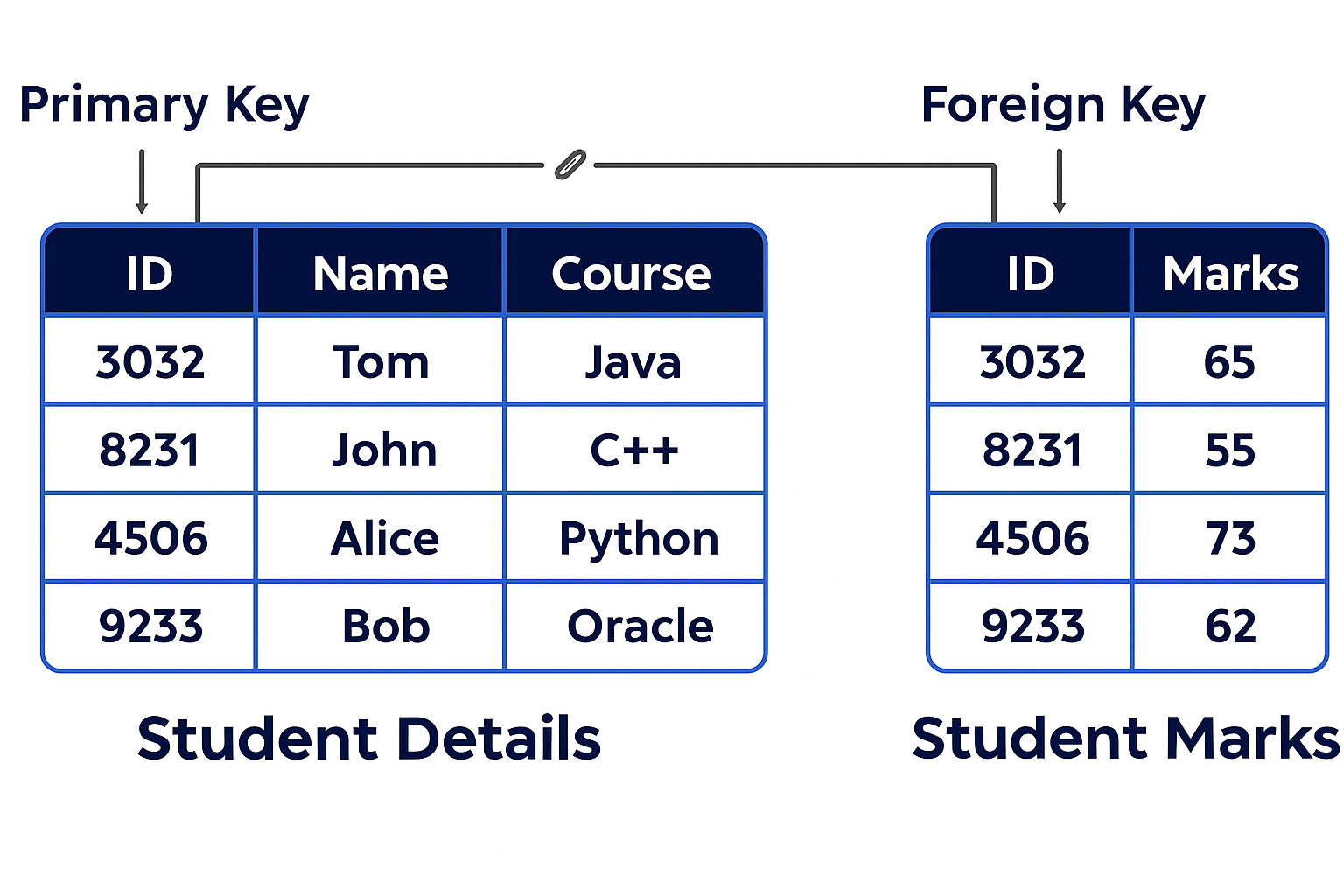
You’ve learned how a primary key gives every row its own special ID! The image below shows this in action. It displays a Student Details table with ID as the primary key, containing ID: 3032, Name: Tom, Course: Java, ID: 8231, Name: John, Course: C++, ID: 4506, Name: Alice, Course: Python, and ID: 9233, Name: Bob, Course: Oracle. This ensures every student has a unique identifier, just like a roll number in a class!
📘 Foreign Key: Connecting the Dots!
What Is a Foreign Key?
A foreign key is like a friendship bracelet that links two tables. It’s a column in one table that points to a primary key in another table. It:
- Creates relationships (e.g., a student to their marks).
- Can have duplicates or be empty (NULL) unless you set rules.
- Stops you from adding invalid links (e.g., a student ID that doesn’t exist).
Creating a Foreign Key
You add a foreign key when creating a table, and it must match a primary key in another table.
How It Works: The FK (e.g., ID in Student Marks) must match a value in the PK (e.g., ID in Student Details). If not, SQL says, “No way!”
Example:
- SQL Code
- Output
CREATE TABLE Student_Details (
ID INT PRIMARY KEY, -- Primary key
Name VARCHAR(50),
Course VARCHAR(50)
);
CREATE TABLE Student_Marks (
ID INT,
Marks INT,
FOREIGN KEY (ID) REFERENCES Student_Details(ID) -- Links to Student_Details.ID
);
INSERT INTO Student_Details (ID, Name, Course) VALUES (3032, 'Tom', 'Java'); -- Add student
INSERT INTO Student_Marks (ID, Marks) VALUES (3032, 65); -- Link to Tom
-- This will fail: INSERT INTO Student_Marks (ID, Marks) VALUES (999, 50); -- No student 999!
Student Details Table:
| ID | Name | Course |
|---|---|---|
| 3032 | Tom | Java |
Student Marks Table:
| ID | Marks |
|---|---|
| 3032 | 65 |
Cascading Actions with Foreign Keys (Smart Changes!)
You can tell SQL what to do when the primary key data changes:
- ON DELETE CASCADE: If you delete a student, their marks vanish too.
- ON UPDATE CASCADE: If a student’s ID changes, their marks update automatically.
How It Works: This keeps related data in sync without extra work.
Example:
- SQL Code
- Output
CREATE TABLE Student_Marks (
ID INT,
Marks INT,
FOREIGN KEY (ID) REFERENCES Student_Details(ID) ON DELETE CASCADE
);
INSERT INTO Student_Details (ID, Name, Course) VALUES (3032, 'Tom', 'Java');
INSERT INTO Student_Marks (ID, Marks) VALUES (3032, 65);
DELETE FROM Student_Details WHERE ID = 3032; -- Deletes Tom and his marks!
Before Delete: Student Details Table:
| ID | Name | Course |
|---|---|---|
| 3032 | Tom | Java |
Student Marks Table:
| ID | Marks |
|---|---|
| 3032 | 65 |
After Delete: (Both tables empty)
What NOT to Do:
- Don’t create the FK table before the PK table—SQL needs the PK first!
- Avoid CASCADE if you want to keep related data after deletions!
📙 Conclusion for Foreign Key
Awesome job! You’ve learned how a foreign key connects tables like magic. The image below shows this in action. It displays the Student Details table with ID as the primary key (ID: 3032, Name: Tom, Course: Java, etc.) and the Student Marks table with ID as the foreign key (ID: 3032, Marks: 65, etc.), linking students to their marks. This keeps everything connected perfectly!
🧩 Comparison: Primary Key vs. Foreign Key
Let’s compare these two keys side by side to see how they’re different and work together!
| Feature | Primary Key (PK) | Foreign Key (FK) |
|---|---|---|
| Purpose | Uniquely identifies each row in one table. | Links to a PK in another table. |
| Uniqueness | Must be unique and not NULL. | Can have duplicates or NULL (unless restricted). |
| Location | One per table, in that table. | In a different table, pointing to a PK. |
| Example | ID in Student_Details table. | ID in Student_Marks table. |
| Changes | Can’t change easily—used as a base. | Can update or delete with CASCADE rules. |
| Use Case | Identifying a student (e.g., roll number). | Connecting a student to their marks. |
Simple Explanation:
- A PK is like your personal ID number—it’s yours alone in your table.
- An FK is like a reference to someone else’s ID—it connects your table to theirs.
- Together, they build a network where every piece of data fits perfectly!
Example of Both Together:
- SQL Code
- Output
CREATE TABLE Student_Details (
ID INT PRIMARY KEY,
Name VARCHAR(50),
Course VARCHAR(50)
);
CREATE TABLE Student_Marks (
ID INT,
Marks INT,
FOREIGN KEY (ID) REFERENCES Student_Details(ID)
);
INSERT INTO Student_Details (ID, Name, Course) VALUES (3032, 'Tom', 'Java');
INSERT INTO Student_Marks (ID, Marks) VALUES (3032, 65);
Student Details Table:
| ID | Name | Course |
|---|---|---|
| 3032 | Tom | Java |
Student Marks Table:
| ID | Marks |
|---|---|
| 3032 | 65 |
What NOT to Do: Don’t mix up PK and FK roles—use PK for unique IDs and FK for linking only!
✅ What You’ve Learned
You’re a SQL star! You’ve mastered:
- Primary Key: Your table’s unique identifier.
- Foreign Key: The link between tables.
- Comparison: How they differ and work together.
- Cascading: Smart updates and deletes.
Try creating tables with both PK and FK, and test CASCADE. Avoid the "What NOT to Do" tips to keep your database strong and connected!